

Top Instagram Growth Tools to Increase Followers Organically Affiliate opportunities: Instagram analytics, hashtag research, content planning tools.
Discover the best Instagram growth tools for organic followers in 2026, including analytics, hashtag research, content planning, scheduling and competitor analysis tools.

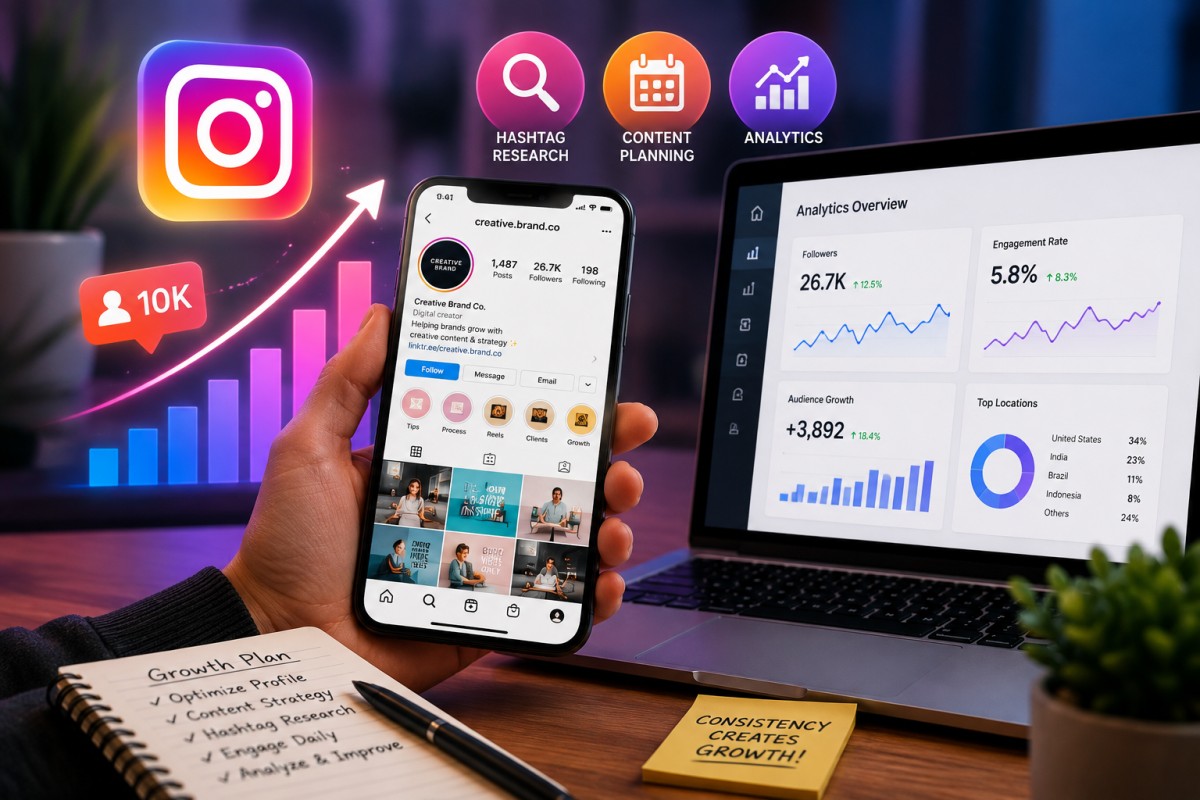
Growing on Instagram organically sounds simple: create good content, post consistently and interact with people.
In reality, it can be difficult to know what to post, when to post it, which content is actually working and how people are discovering your account.
That is where Instagram growth tools can help.
The right tools do not magically produce thousands of followers overnight. Instead, they help you understand your audience, research content opportunities, plan consistently, discover relevant hashtags and measure what is working.
That approach is much closer to sustainable organic growth. Upwork's guide on organic Instagram growth similarly emphasizes quality content, consistency, engagement and building genuine relationships rather than relying on spammy or artificial follower tactics.
In this guide, we look at some of the most useful Instagram growth tools in 2026, what they do, how much they cost and who should consider using them.
Important: Prices mentioned below are approximate starting prices and can change based on billing cycle, region, number of accounts and plan updates.
What Are Instagram Growth Tools?
Instagram growth tools are software platforms that help with different parts of your Instagram strategy.
Depending on the tool, they can help you:
- Track follower growth
- Analyse engagement
- Understand audience behaviour
- Find your best-performing posts
- Research hashtags
- Discover content ideas
- Plan your Instagram feed
- Schedule posts and Reels
- Analyse competitors
- Create content
- Prepare social media reports
- Identify the best times to publish
The important distinction is between growth tools and fake follower services.
A genuine growth tool helps you make better decisions. A service promising thousands of followers through bots, fake accounts or aggressive automated engagement is a completely different proposition and can create account-safety and credibility problems. Current industry guidance continues to recommend focusing on analytics, scheduling, content optimisation and genuine engagement rather than artificial growth tactics.
Best Instagram Growth Tools at a Glance
| Tool | Main Purpose | Best Feature | Starting Price* | Best For |
|---|---|---|---|---|
| Instagram Insights | Analytics | Native audience and content data | Free | Everyone |
| Meta Business Suite | Scheduling + analytics | Free publishing and management | Free | Small businesses |
| Metricool | Analytics + scheduling | Competitor tracking and reporting | From $25/month | Agencies and businesses |
| Later | Planning + scheduling | Visual Instagram planner | From $18.75/month billed annually | Creators and brands |
| Buffer | Scheduling + analytics | Simple publishing workflow | Free; paid from $5/channel/month annually | Beginners and small businesses |
| Flick | Hashtag research | Hashtag discovery and analytics | From £11/month annually | Creators and brands |
| Iconosquare | Analytics | Detailed Instagram reporting | From €33/month billed annually | Brands and agencies |
| Hootsuite | Management + analytics | Advanced analytics and listening | Paid plans | Businesses and agencies |
| Socialinsider | Analytics | Competitor benchmarking | Paid plans | Agencies and marketers |
| Canva | Content creation | Instagram graphics and templates | Free; Pro from $144/year | Creators and businesses |
| CapCut | Reels creation | Short-form video editing | Free; paid Pro plan | Reels creators |
*Pricing can change. Always check the provider's current plan before purchasing.
1. Instagram Insights - Best Free Analytics Tool
Before paying for a third-party platform, don't overlook Instagram's own analytics.
Instagram Insights provides account and content performance information for eligible professional accounts.
You can use it to understand things such as:
- Reach
- Accounts engaged
- Follower growth
- Content performance
- Audience information
- Post and Reel performance
- Content interactions
Why it matters for organic growth
Suppose you post five Reels in a month.
Instead of simply asking, "Which Reel got the most likes?", look at the bigger picture.
Which Reel:
- Reached the most non-followers?
- Generated the most shares?
- Produced profile visits?
- Generated follows?
- Kept people watching?
Those numbers can tell you what type of content deserves more attention.
Pricing
Free.
Best for
Beginners, creators and small businesses that want to understand their account before investing in additional software.
2. Meta Business Suite - Best Free Planning Tool
If you manage a business account, Meta Business Suite can be a useful starting point for managing Instagram and Facebook content.
It can help businesses with:
- Scheduling
- Content management
- Basic analytics
- Inbox management
- Facebook and Instagram publishing
Why it's useful
You don't necessarily need an expensive social media management platform when you're managing one small business account.
For someone just starting out, Meta's own ecosystem can handle many basic requirements.
Pricing
Free.
Best for
Small businesses, local businesses, new creators and anyone who wants a no-cost starting point.
3. Metricool - Best for Analytics and Reporting
Metricool is particularly interesting for businesses and agencies because it combines publishing, analytics and competitor research.
Its current free plan supports one brand, up to 20 scheduled posts per month and competitor analysis for five profiles. Paid Starter plans begin at around $25 per month in the US, depending on the selected configuration.
Key features
- Instagram scheduling
- Analytics
- Competitor analysis
- Content planning
- Reporting
- Best-time insights
- Social media calendar
- AI social media assistant
- Link-in-bio features
Why it can help growth
The biggest advantage isn't simply scheduling.
It's being able to connect what you published with what happened afterward.
For agencies, this is particularly useful because performance reports can show clients which content formats are generating reach and engagement.
Pricing
- Free plan
- Paid plans from around $25/month in the US
Best for
Agencies, social media managers, businesses and data-focused marketers.
4. Later - Best for Instagram Content Planning
Later is especially useful if your Instagram strategy depends heavily on visuals.
Its visual planning approach allows you to see how your content will appear before publishing.
Current Later plans include scheduling, analytics, AI content tools, visual planning and other social management features. The Starter plan currently starts at about $18.75/month when billed annually, while Growth starts at around $37.50/month billed annually.
Key features
- Visual Instagram planner
- Post scheduling
- Reels scheduling
- Analytics
- Best time to post
- AI content assistance
- Link in bio
- Social inbox
- Team collaboration
Why it can help growth
Consistency is easier when you can plan content in advance.
Instead of opening Instagram every morning and asking:
"What should I post today?"
you can prepare your week's content beforehand.
Pricing
Starting at approximately $18.75/month billed annually.
Best for
Instagram creators, influencers, fashion brands, jewellery brands, restaurants, travel accounts and other visually driven businesses.
5. Buffer - Best Simple Instagram Scheduler
Buffer is a good choice for people who don't want a complicated social media dashboard.
Its current free plan supports up to three channels, while Essentials starts at $5/month per channel when billed annually. Paid plans include features such as advanced analytics, hashtag management and unlimited scheduled posts.
Key features
- Instagram scheduling
- Content calendar
- AI Assistant
- Analytics
- Hashtag manager
- First-comment scheduling
- Community inbox
- Team collaboration
Why it can help growth
Buffer's strength is consistency.
You can prepare content in advance and create a predictable publishing schedule instead of relying on memory.
Pricing
- Free plan available
- Essentials from $5/month per channel, billed annually
Best for
Freelancers, creators and small businesses.
6. Flick - Best for Instagram Hashtag Research
Hashtags aren't a magic shortcut to viral growth, but researching relevant terms can still be useful as part of a broader content-discovery strategy.
Flick focuses heavily on hashtag research and Instagram content planning.
Key features
- Hashtag search
- Hashtag collections
- Suggested hashtags
- Advanced hashtag metrics
- Hashtag performance tracking
- Content scheduling
- Best-time recommendations
- Analytics
- AI content assistance
Its current Solo plan starts at around £11/month when billed annually, with Pro and Agency plans offering additional users, social accounts and features.
How to use it properly
Don't simply search for a popular hashtag and add it to every post.
Instead, look for hashtags and topics that are:
- Relevant to your niche
- Relevant to the specific post
- Appropriate for your target audience
- Connected to the subject you're actually discussing
Pricing
From approximately £11/month billed annually.
Best for
Creators, niche businesses and marketers who want more structured hashtag research.
7. Iconosquare - Best for Detailed Instagram Analytics
If Instagram analytics are your priority, Iconosquare is worth considering.
It focuses heavily on measurement, reporting and benchmarking.
Current plans include Launch, Scale, Excel and Custom options. Launch starts at around €33/month when billed annually for five social profiles, according to its current pricing page.
Key features
- Instagram analytics
- Post performance
- Audience analytics
- Competitor benchmarking
- Industry benchmarking
- Reporting
- Social media calendar
- Social inbox
- AI content inspiration
Why it can help growth
It's useful when you're past the beginner stage and want to understand not just whether your account is growing, but why.
Pricing
From approximately €33/month billed annually for the current Launch configuration.
Best for
Established brands, agencies and professional social media managers.
8. Hootsuite - Best for Larger Social Media Teams
Hootsuite is designed for businesses that need more than basic scheduling.
Its current Standard offering includes scheduling, AI-assisted content creation, analytics, hashtag tools, inbox management, competitor benchmarking and social listening features.
Key features
- Instagram scheduling
- Analytics
- Social listening
- AI content assistance
- Hashtag research
- Competitor monitoring
- Unified inbox
- Team collaboration
- Reporting
Why it can help growth
Large brands often need to understand conversations happening around their business, not simply their own posts.
Social listening can help identify:
- Brand mentions
- Emerging conversations
- Customer concerns
- Industry trends
- Competitor activity
Pricing
Premium paid plans; pricing depends on plan and account requirements.
Best for
Marketing teams, larger businesses and agencies.
9. Socialinsider - Best for Competitor Analysis
Socialinsider takes a data-heavy approach to social media analytics.
Rather than focusing only on your own Instagram account, it can help marketers compare performance and identify broader content trends.
Useful for
- Competitor benchmarking
- Engagement analysis
- Content performance
- Reporting
- Social media research
Why it matters
Imagine you discover that your competitors' carousels consistently generate more engagement than their static posts.
That's useful information.
You can then test whether a similar content format works for your own audience.
The key word is test.
Competitor performance is inspiration, not a guarantee that the same strategy will work for you.
Pricing
Paid plans vary according to accounts, features and reporting requirements.
Best for
Agencies, marketers and businesses that want deeper competitive analysis.
10. Canva - Best for Creating Instagram Content
Analytics tell you what to create.
But you still need to actually create it.
That's where Canva comes in.
Key features
- Instagram post templates
- Carousel designs
- Stories
- Reels covers
- Brand kits
- AI design features
- Image editing
- Video editing
- Content resizing
Canva currently offers a free plan, while its individual Pro plan is listed at $144/year in the US.
Why it can help growth
Better design doesn't automatically mean more followers.
But professional, readable and consistent visuals can make it easier for users to understand and engage with your content.
Pricing
- Free
- Pro: around $144/year for an individual in the US
Best for
Creators, brands, agencies and small businesses.
11. CapCut - Best for Instagram Reels
If Reels are central to your strategy, video editing can become one of your biggest time-consuming tasks.
CapCut provides a range of editing and AI-assisted tools designed around short-form video.
Useful features
- Video editing
- Auto captions
- Templates
- Effects
- Background removal
- Transitions
- Text animation
- Short-form video workflows
Why it can help growth
Instagram is heavily visual, and short-form video gives creators another way to reach people who don't already follow them.
But the tool itself isn't what creates growth.
The hook, story, editing and usefulness of the video still matter.
Pricing
Free version available, with paid Pro features.
Best for
Reels creators, influencers, businesses and video-first accounts.
Do Instagram Growth Tools Actually Increase Followers?
This is where expectations need to be realistic.
No legitimate tool can guarantee organic follower growth.
A scheduling platform cannot force people to follow you.
A hashtag research tool cannot make an average post viral.
An analytics dashboard cannot replace good content.
What these tools can do is remove some of the friction around growing.
For example:
Analytics → understand what works
↓
Content planning → create more of it
↓
Hashtag/topic research → improve discovery
↓
Scheduling → stay consistent
↓
Engagement → build relationships
↓
Measurement → improve the next campaign
That is the real growth loop.
How to Use Instagram Growth Tools Together
You don't need all 11 tools.
In fact, using too many can make your workflow unnecessarily complicated.
For beginners
Instagram Insights + Canva + Meta Business Suite
You can create content, schedule it and analyse performance without paying for software.
For creators
Later + Canva + Flick
This combination covers visual planning, content creation and hashtag research.
For small businesses
Buffer + Canva + Instagram Insights
A relatively simple system for planning, publishing and measuring.
For agencies
Metricool + Canva + Iconosquare
This combination gives you publishing, creative production, analytics and reporting capabilities.
For larger marketing teams
Hootsuite + Canva + advanced analytics
Useful when multiple people need access, approvals, monitoring and reporting.
What About Instagram Growth Automation?
You will find plenty of services promising:
"Get 10,000 followers in 30 days."
Be careful.
Organic growth should not be confused with automated following, mass liking, fake engagement or purchased followers.
Artificial numbers can create a strange situation where an account has 50,000 followers but only a few hundred people actually engage with its content.
That can hurt credibility with:
- Brands
- Customers
- Potential clients
- Advertisers
- Collaborators
A smaller audience that actually watches, saves, shares and comments on your content can be much more valuable.
How to Grow Instagram Followers Organically in 2026
Tools work best when they're combined with a sensible content strategy.
1. Create content for a specific audience
Don't try to appeal to everyone.
A jewellery brand, fitness creator and local restaurant should have completely different content strategies.
2. Focus on shareable content
Ask:
Would someone send this post to a friend?
If the answer is yes, you've created a stronger opportunity for organic discovery.
3. Use Reels strategically
Short-form video can introduce your account to people who don't already follow you.
But don't create Reels simply because everyone else is doing it.
Create videos that teach, entertain, demonstrate or tell a story.
4. Study your analytics
Don't obsess over follower count alone.
Look at:
- Reach
- Shares
- Saves
- Comments
- Profile visits
- Follows from content
- Engagement
- Watch time where available
5. Build a recognisable identity
People should eventually be able to see one of your posts and recognise that it belongs to your brand.
That can come from:
- Colours
- Typography
- Photography
- Editing style
- Tone of voice
- Recurring content formats
6. Talk to your audience
Organic growth is not just broadcasting.
Reply to comments.
Answer questions.
Participate in relevant conversations.
Pay attention to what followers repeatedly ask you.
Those conversations can become your next content ideas.
Affiliate Opportunity: Can Instagram Growth Tools Make Money?
Yes, this niche can be attractive for affiliate marketing because many social media tools operate on subscription-based models.
However, the best affiliate strategy isn't to list 30 products and attach an affiliate link to every name.
Instead, create useful comparisons.
For example:
- Best Instagram analytics tools for small businesses
- Later vs Buffer
- Metricool vs Hootsuite
- Best hashtag research tools for Instagram
- Best Instagram scheduling tools for agencies
- Best free Instagram growth tools
- Best Instagram tools for influencers
- Best Instagram analytics tools for e-commerce
- Best Instagram tools for local businesses
You can also create separate tutorials showing readers how to use each tool.
That attracts people who aren't merely researching software but are actively looking for a solution.
Final Verdict: Which Instagram Growth Tool Should You Choose?
There isn't one tool that is best for everyone.
If you're just starting, Instagram Insights and Meta Business Suite can take you surprisingly far without a subscription.
If you need simple scheduling, Buffer is worth considering.
If visual planning is important, Later is a strong option.
For analytics and reporting, Metricool and Iconosquare stand out.
For hashtag research, Flick is particularly focused on that job.
For larger teams, Hootsuite provides a much broader management system.
And for creating Instagram visuals, Canva remains one of the most practical choices.
The bigger lesson is this: don't use an Instagram tool because it promises growth. Use it because it helps you understand your audience, create better content, publish consistently or make smarter decisions.
That is what turns a collection of followers into a genuine Instagram community.
Frequently Asked Questions
What's Your Reaction?
 Like
0
Like
0
 Dislike
0
Dislike
0
 Love
0
Love
0
 Funny
0
Funny
0
 Wow
0
Wow
0
 Sad
0
Sad
0
 Angry
0
Angry
0









Comments (0)