

Canva vs Adobe Express vs VistaCreate: Which Design Tool Is Best for Social Media?
Canva vs Adobe Express vs VistaCreate: compare features, pricing, AI tools, templates, scheduling and ease of use to find the best design tool for social media.

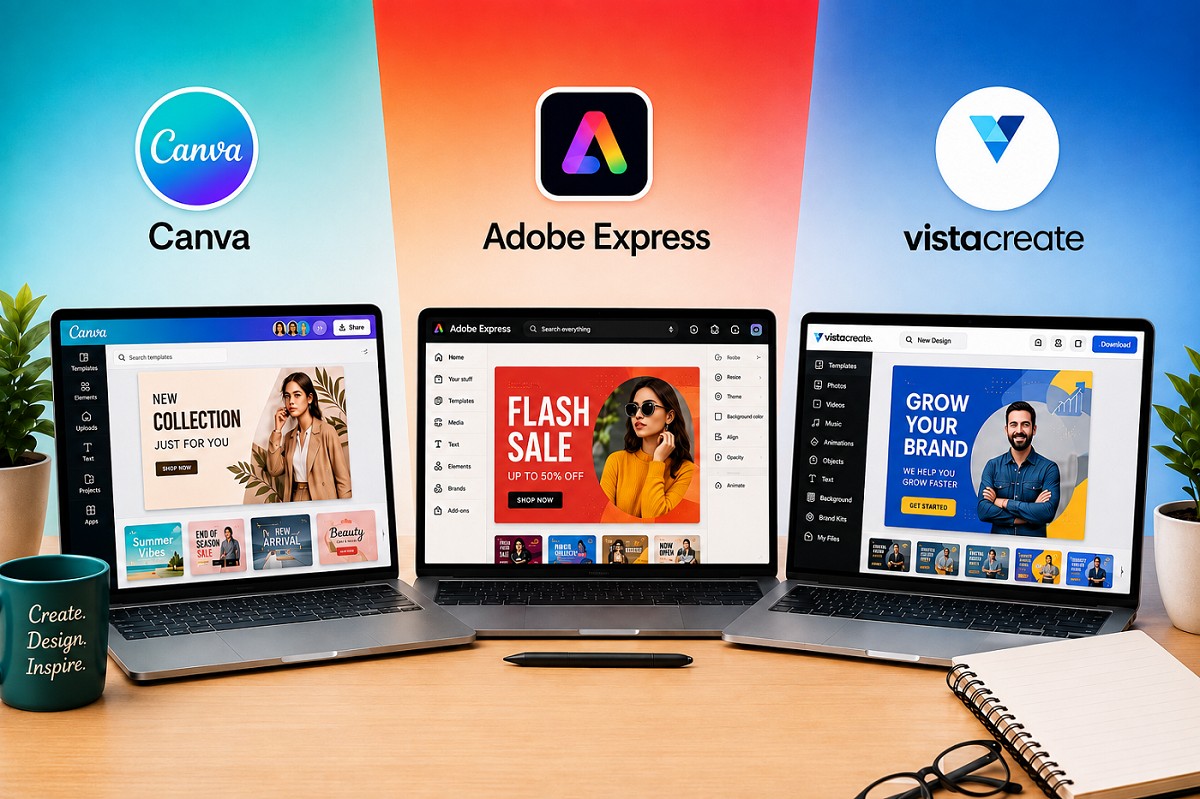
Creating social media content no longer requires advanced graphic-design skills. Today, platforms such as Canva, Adobe Express and VistaCreate allow businesses, creators and agencies to design Instagram posts, Reels covers, Stories, YouTube thumbnails, advertisements and other marketing creatives in minutes.
But there is a problem: which one should you actually pay for?
Canva is known for its simplicity and enormous template ecosystem. Adobe Express brings Adobe's creative technology, stock library and AI features into a much simpler interface. VistaCreate, meanwhile, offers an attractive alternative for users who want ready-made social media designs without paying for a more complex professional design suite.
So, Canva vs Adobe Express vs VistaCreate - which is best for social media in 2026?
The answer depends on how you work, how much control you need and whether you're designing alone or as part of a team.
Pricing note: Subscription prices can vary by country, billing cycle, taxes, promotions and account type. The prices mentioned below are indicative of the currently published plans and should be checked at checkout before purchasing. Adobe's India pricing currently lists Express Premium at ₹398.84/month including GST, while VistaCreate lists Pro at $10/month. Canva states that pricing varies by location.
Canva vs Adobe Express vs VistaCreate at a Glance
Social media design tool comparison
| Feature | Canva | Adobe Express | VistaCreate |
|---|---|---|---|
| Ease of use | Excellent | Excellent | Very good |
| Social media templates | Excellent | Excellent | Very good |
| AI tools | Excellent | Excellent | Good |
| Photo editing | Very good | Excellent | Good |
| Video creation | Excellent | Excellent | Very good |
| Brand management | Excellent | Excellent | Good |
| Social scheduling | Yes | Yes | Yes |
| Collaboration | Excellent | Excellent | Good |
| Stock assets | Excellent | Excellent | Excellent |
| Best suited to | Most users | Adobe ecosystem users | Budget-conscious creators |
1. Canva: The All-Rounder for Social Media
Canva is probably the first name that comes to mind when someone says "easy graphic design."
Its biggest advantage is that it makes professional-looking design accessible to people who aren't trained designers.
You can start with a template, replace the photos and text, adjust colours and export the finished creative without spending hours learning complicated software.
Canva's current Pro offering includes premium content, Brand Kits, AI-powered tools, Magic Resize, background removal, social scheduling and other features aimed at faster content production. Canva says its Pro plan provides access to more than 100 million premium photos, graphics, videos, fonts and audio tracks.
Unique Canva features
Some of Canva's biggest advantages include:
- Magic Resize
- Brand Kits
- Canva AI
- Magic Write
- Magic Eraser
- Magic Grab
- Bulk content creation
- Social Content Planner
- Video editing
- Presentations
- Whiteboards
- Social media templates
- Large stock-content library
The Magic Resize feature is particularly useful for social media managers.
You might create one Instagram post and then quickly adapt it for different social platforms rather than rebuilding every version manually.
Canva's biggest advantage
It is extremely handy.
If you're running a business and need to create an Instagram post at 10 p.m. without calling a designer, Canva is one of the easiest solutions.
Canva pricing
Canva offers a free plan, while paid plans include Canva Pro and Canva Business. Canva's current pricing system is location-dependent, so the amount shown to an Indian user may differ from prices displayed in other countries.
Canva also introduced Canva Business for individuals, marketers and small teams, adding collaboration, brand-management and additional AI and marketing features on top of the Pro experience.
Canva is best for
- Social media managers
- Small businesses
- Influencers
- Bloggers
- Marketing agencies
- Entrepreneurs
- Freelancers
- Beginners
2. Adobe Express: Best for Adobe Users and Creative Control
Adobe Express takes a different approach.
Instead of expecting users to learn Photoshop or Illustrator, Adobe created a simplified design platform that brings some of the company's creative ecosystem into an easier interface.
That makes Express particularly interesting if you already use Adobe products.
What makes Adobe Express different?
One of its biggest strengths is its connection with the wider Adobe ecosystem.
Adobe highlights integration with products such as Photoshop, Illustrator, InDesign, Firefly, Acrobat and Lightroom.
That can be a major advantage for professional content teams.
For example, a designer could work on a more sophisticated asset in Photoshop and then use Express for faster social-media adaptations.
Adobe Express features
Key features include:
- Social media templates
- Photo editing
- Video editing
- Animation
- Background removal
- One-click resize
- Brand Kits
- Social media scheduling
- Adobe Stock assets
- Adobe Fonts
- Generative AI
- PDF tools
- Content planning
Adobe Express Premium currently includes 250 generative credits per month, premium templates, access to a much larger Adobe Stock library, more fonts, 100GB storage and social scheduling for up to three accounts per social network.
Adobe Express pricing
Adobe Express has a free plan.
In India, Adobe currently lists:
- Adobe Express Free: ₹0
- Adobe Express Premium: ₹398.84/month including GST
- Adobe Express Teams: introductory pricing of ₹419/month per licence excluding GST, with a two-seat minimum; the listed regular price is ₹670/month per licence excluding GST.
Adobe also offers broader Creative Cloud options that include Express alongside other Adobe applications.
Adobe Express's biggest advantage
Its Adobe ecosystem.
If your workflow already includes Photoshop, Illustrator, Lightroom or other Adobe products, Express can fit naturally into that workflow.
Adobe Express is best for
- Professional marketers
- Designers
- Adobe users
- Agencies
- Businesses with brand-heavy content
- Teams that need stronger creative workflows
3. VistaCreate: The Underrated Alternative
VistaCreate may not have the same name recognition as Canva or Adobe, but it deserves attention.
Its basic philosophy is similar: choose a template, customise it and publish your content.
The platform is particularly focused on ready-made designs for businesses and social media.
VistaCreate features
Its Pro offering currently includes:
- 200,000+ design templates
- 170 million+ photos, videos and vectors
- Unlimited storage
- Unlimited Brand Kits
- Generative AI for images and text
- One-click resizer
- Sticker Maker
- Version history
- HD downloads
VistaCreate currently lists its Pro plan at $10/month, with the displayed offer covering up to 10 seats.
What makes VistaCreate interesting?
It can be a good choice for someone who wants a large collection of ready-made marketing designs without moving into a more complicated professional design environment.
VistaCreate's biggest advantage
Value and simplicity.
For a small business owner who mainly needs social posts, advertisements, Stories and promotional graphics, VistaCreate can cover many everyday requirements.
VistaCreate is best for
- Small businesses
- Bloggers
- Freelancers
- Creators
- Social media managers
- Budget-conscious teams
Canva vs Adobe Express vs VistaCreate: Feature Comparison
| Feature | Canva | Adobe Express | VistaCreate |
|---|---|---|---|
| Free plan | Yes | Yes | Yes |
| Social templates | Excellent | Excellent | Very good |
| AI design tools | Excellent | Excellent | Good |
| AI image generation | Yes | Yes | Yes |
| Video editing | Excellent | Excellent | Very good |
| Photo editing | Very good | Excellent | Good |
| Background remover | Yes | Yes | Yes |
| One-click resizing | Yes | Yes | Yes |
| Brand Kits | Yes | Yes | Yes |
| Social scheduling | Yes | Yes | Yes |
| Collaboration | Excellent | Excellent | Good |
| Stock photos/videos | Excellent | Excellent | Excellent |
| Advanced Adobe integration | No | Yes | No |
| Beginner-friendly | Excellent | Excellent | Very good |
| Professional creative workflow | Very good | Excellent | Good |
| Best overall for social media | Yes | Strong alternative | Budget alternative |
Which Tool Has the Best Templates?
This is where Canva has a particularly strong advantage.
Canva has built a huge ecosystem around templates for almost every type of content imaginable.
You can find designs for:
- Instagram posts
- Instagram Stories
- Reels covers
- YouTube thumbnails
- LinkedIn posts
- Facebook ads
- Presentations
- Posters
- Brochures
- Menus
- Business cards
- Infographics
Adobe Express also has a large template ecosystem, with both static and video templates. Adobe's current India pricing page lists hundreds of thousands of templates even on the free tier and a larger premium selection.
VistaCreate also focuses heavily on ready-made templates, with its Pro offering currently listing more than 200,000 design templates.
Winner: Canva
For sheer variety and ease of finding a suitable social media template, Canva is the easiest recommendation.
Which One Is Best for AI Features?
All three platforms have moved aggressively into AI.
Canva
Canva offers AI-powered tools for writing, image creation, design generation, resizing, editing and content production. Its current Pro offering highlights 25+ AI-powered design features.
Adobe Express
Adobe has the advantage of the Firefly ecosystem.
Express Premium includes generative AI credits, while Adobe positions Firefly as its broader generative-creative platform.
VistaCreate
VistaCreate Pro also includes generative AI capabilities for images and text.
Winner: Adobe Express for advanced creative AI ecosystem
For straightforward AI-assisted social content, Canva is arguably easier.
But for someone already invested in Adobe's creative ecosystem, Adobe Express has a stronger overall proposition.
Which Is Easiest to Use?
If you're completely new to design, the difference becomes important.
Canva
Very beginner-friendly. Most functions are easy to discover.
Adobe Express
Also beginner-friendly, although its broader Adobe ecosystem can make it feel slightly more feature-heavy.
VistaCreate
Simple and approachable, particularly for template-based content.
Winner: Canva
Canva gets the edge because its workflow is extremely intuitive for everyday social media creation.
Which Is Best for Instagram?
For Instagram specifically, all three can handle the basics:
- Posts
- Stories
- Reels covers
- Video
- Promotional graphics
- Brand content
- Resizing
- Scheduling
But Canva has a particularly strong advantage because of its template ecosystem and content-planning workflow. Canva's Pro features include a Social Content Planner that can plan, schedule and publish to multiple social channels.
Winner: Canva
For most Instagram-focused businesses and creators, Canva is the easiest choice.
Which Is Better for Professional Designers?
This is where the answer changes.
If you're already comfortable with Photoshop, Illustrator and other Adobe applications, Adobe Express can make more sense.
You aren't necessarily replacing your professional Adobe workflow. You're adding a faster environment for everyday content.
For example:
Photoshop → detailed image editing
Illustrator → vector artwork
Adobe Express → fast social media content
That combination can be extremely useful for agencies and professional creative teams.
Winner: Adobe Express
Which Is Best for Small Businesses?
Suppose you're running a café, jewellery brand, salon, clothing store or local business.
You probably don't need an extremely complicated design workflow.
You need to make:
- Instagram posts
- Stories
- Offers
- Product graphics
- Reels covers
- Festival creatives
- Advertisements
- Flyers
In that situation, ease of use matters more than advanced professional tools.
Winner: Canva
It offers the best combination of templates, simplicity, branding, AI tools and social-media functionality for most small businesses.
Which Is Best for Agencies?
For agencies, the decision becomes more complicated.
An agency may need:
- Multiple brands
- Brand Kits
- Team collaboration
- Approval workflows
- Shared assets
- Templates
- Client-specific designs
- Social scheduling
- Content resizing
- Consistent branding
Canva is particularly attractive because of its collaboration and brand-management capabilities, while Adobe Express Teams offers brand controls, template locking, asset management and administrative features.
Winner: Canva for most social media agencies
But choose Adobe Express if:
Your agency already uses Adobe Creative Cloud extensively.
Canva vs Adobe Express vs VistaCreate: Pricing
| Platform | Free plan | Paid option | Pricing note |
|---|---|---|---|
| Canva | Yes | Pro / Business | Pricing varies by location and plan |
| Adobe Express | Yes | Premium / Teams | Premium currently ₹398.84/month incl. GST in India |
| VistaCreate | Yes | Pro | Currently listed at $10/month |
Adobe's published India pricing confirms the current Express Premium price, while VistaCreate's official page lists Pro at $10/month. Canva says pricing varies according to location and billing information.
Important: Don't choose purely on subscription price. A slightly more expensive tool can be cheaper overall if it saves hours of work every month.
Which Tool Is More Handy for Everyday Social Media Work?
Let's imagine you need to create an Instagram post in 15 minutes.
You open each platform.
Canva
Pick a template → replace images → change brand colours → resize → download or schedule.
Very fast.
Adobe Express
Pick a template → customise → use Adobe assets or AI → resize → schedule.
Also fast, particularly if you're already familiar with Adobe.
VistaCreate
Pick a template → customise → resize → download/publish.
Straightforward.
Overall winner: Canva
For the average social media manager, Canva remains the most convenient all-in-one option.
The Verdict: Canva vs Adobe Express vs VistaCreate
There isn't a universal winner.
Instead, each tool has a clear personality.
Choose Canva if you want:
- The easiest workflow
- Huge template selection
- Strong Instagram support
- Fast content creation
- Brand Kits
- AI tools
- Social scheduling
- Easy collaboration
- A tool that non-designers can learn quickly
Best overall choice for most social media users.
Choose Adobe Express if you want:
- Adobe ecosystem integration
- Strong photo and video tools
- Firefly-powered AI
- Adobe Stock
- Adobe Fonts
- Professional brand workflows
- Better integration with other Adobe applications
Best choice for Adobe users and creative professionals.
Choose VistaCreate if you want:
- Simple design tools
- Lots of ready-made templates
- Large stock library
- AI image and text features
- Brand Kits
- One-click resizing
- A potentially attractive alternative to the bigger platforms
Best choice for budget-conscious creators and small businesses.
Final Recommendation
If you're asking me as a friend, start with Canva.
Not because Adobe Express or VistaCreate are bad - they're not. Canva simply removes more friction from everyday social media work.
For a business owner or social media manager, that matters.
You don't want to spend 30 minutes figuring out where a feature is when you could have already created the post.
However, if you're already using Photoshop, Illustrator or Lightroom, give Adobe Express a serious look. The connection between Adobe's creative ecosystem and Express can make your workflow much smoother.
And if you're looking for a simpler alternative with a strong template and stock-content offering, VistaCreate is worth trying before you commit to a subscription.
Our overall ranking for social media
1. Canva - Best overall
2. Adobe Express - Best for Adobe users and professional creative workflows
3. VistaCreate - Best alternative for simple, template-driven content creation
The best design tool is ultimately the one that fits your workflow. If it helps you produce better content faster and maintain consistent branding, it is doing its job.
What's Your Reaction?
 Like
0
Like
0
 Dislike
0
Dislike
0
 Love
0
Love
0
 Funny
0
Funny
0
 Wow
0
Wow
0
 Sad
0
Sad
0
 Angry
0
Angry
0















Comments (0)